
Anime Champions X Champion Inventory Guide
Organize your Champions and items, protect copies you need, and make room for your next summons.
Lock your team and copies reserved for evolution or Ascension, then review the removal list and fruit before dismantling. Set a keep rule for each available rarity before summoning; first discoveries are retained. Extra Storage and Mega Storage stack.
Champion Storage and Active Slots
Open Champions from the sidebar. Storage counts the Champions you own, while Equipped counts your active team. For example, Storage 56/60 leaves four open slots, and Equipped 3/3 means the active team is full.
To expand Champion storage, open Store → Passes. Extra Storage adds 100 slots for 149 Robux or 12 Vouchers; Mega Storage adds 300 slots for 499 Robux or 39 Vouchers. The bonuses stack for 400 additional slots.
Search, Filter and Equip
Search Champions by name or open the filter menu to narrow your roster:
- Rarity: Rare, Epic, Legendary, Mythic or Cosmic.
- Element: Dark, Fire, Light, Nature, Normal, Spark or Water.
- Class: Vanguard, Slayer, Marksman, Mage or Support.
Select Clear to reset the filters. Hover over a card for a quick preview, or right-click to pin its tooltip. Select a Champion to inspect its level, XP, stats, abilities and listed passive, then use Equip or Unequip. Unequip All clears the active team; Equip Best equips a lineup for you.
Switch to Items and use Search Items to find an item by name. Select it to see its description and quantity, then choose Use on a usable item to open its action.
Lock Keepers and Dismantle a Batch
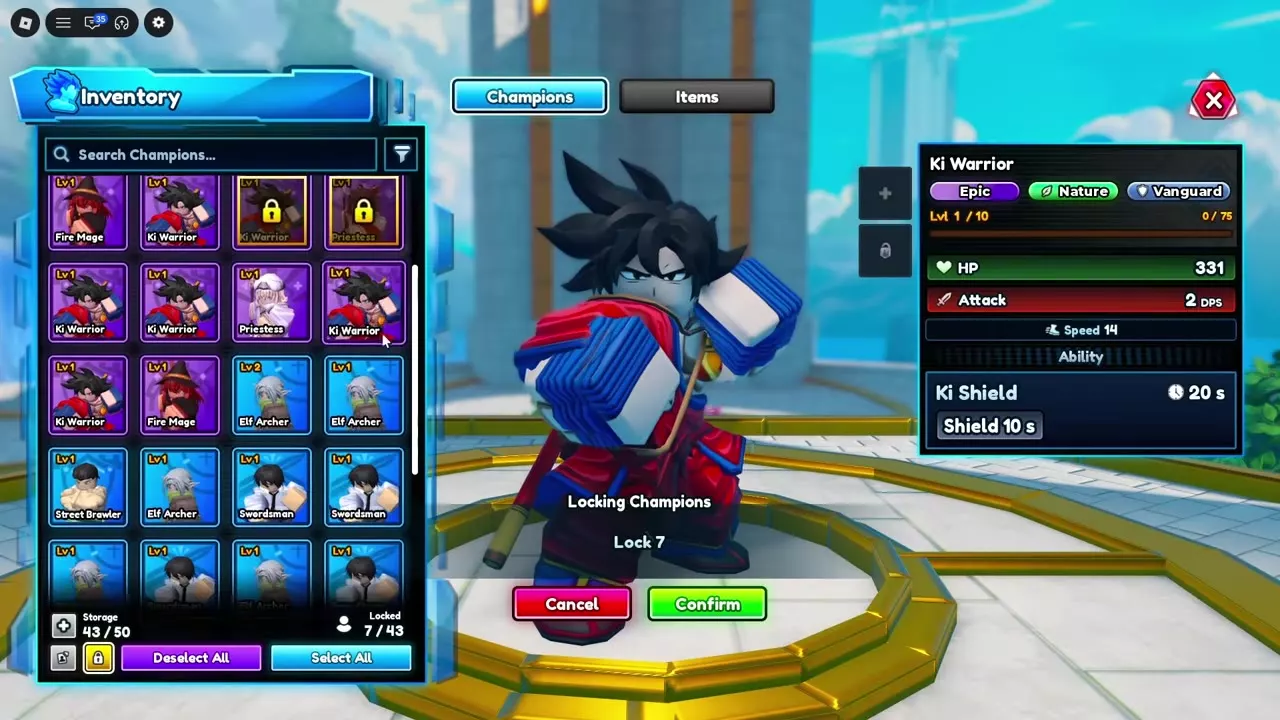
Lock your active and planned team members, Shinies you intend to raise, and copies reserved for evolution or Ascension. Keep a Ki Warrior for the early Blue Planet evolution objective, then lock the resulting Awakened Ki Warrior.
- In Champions, select the padlock to enter lock mode.
- Select the cards you want to lock or unlock. Use Select All or Deselect All as needed.
- Select Confirm, then open a protected Champion's card and check for Locked.
To dismantle unwanted Champions you already own:
- Select Dismantle on a Champion's card, or use the red dismantle button at the lower left of the inventory for a batch.
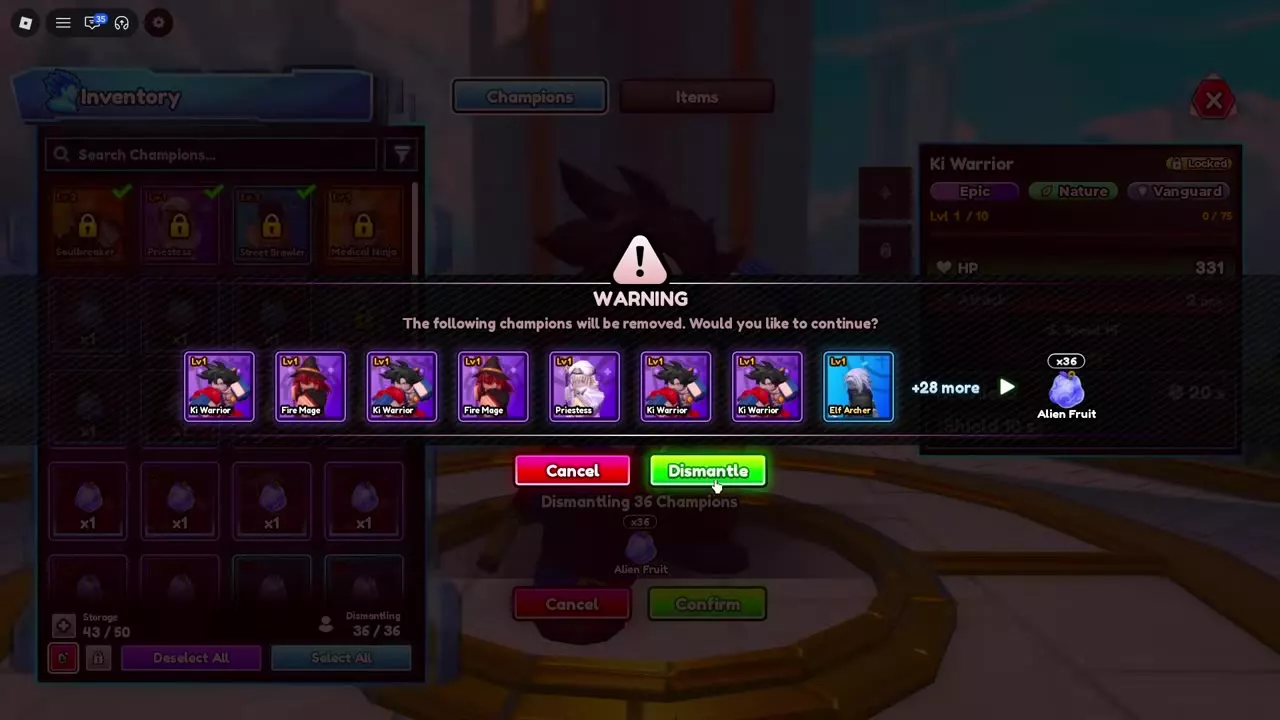
- Select cards individually, drag across them, or use Select All. Use Deselect All to clear the selection. The screen displays the selected count and expected fruit; Confirm becomes available after a Champion is selected.
- Select Confirm and review the Champions and fruit in the warning. Select Dismantle to remove them, or Cancel to return and change the selection.
Set Auto-Dismantle Retention
Open Auto-Dismantle from the Summon screen, or find its gear under Settings → Summon. Set a rule for each of the Rare, Epic and Legendary rows before your next pulls:
- Keep all: Retain every pull of that rarity. Choose this while collecting regular duplicates for Ascension or deciding which copies to build.
- Keep shinies: Retain Shiny pulls and convert regular repeat pulls into fruit.
- Keep none: Convert repeat pulls, including Shinies, into fruit.
A Champion's first discovery is always kept. Results converted by the setting display Dismantled. When all three rows are set to Keep all, the Summon control displays Off. See the summoning guide for the rest of the summon interface.
Read Storage Warnings and Fruit Payouts
A ten-pull can trigger Storage Full even when some slots remain. Choose Cancel and dismantle unwanted copies if you want enough room to retain all ten results. The warning also offers Summon x10 to proceed.
Read the fruit total for the selected batch before confirming. Different batches can produce different totals:
| Batch | Fruit |
|---|---|
| 36 Champions, Blue Planet | 36 Alien Fruit |
| 40 Champions, Blue Planet | 41 Alien Fruit |
| 32 Champions, Pirate Town | 32 Tide Fruit |
| 25 Champions, mixed preview | 10 Tide Fruit, 27 Elemental Fruit |
The 32-Champion Pirate Town batch reduced Storage from 56/60 to 24/60. The mixed batch lists both fruit types in its preview.
Feed Fruit and Save Materials
Use dismantling fruit to level your Champions. Save regular duplicates for Ascension, and keep the Shiny copy you plan to build; the Shiny Champion guide covers those investment choices. Compare the storage upgrades with other permanent benefits in Game Passes and Voucher Redemption.